Quick start
Soneti’s services installation is quite easy and in a few steps you can have a demo services working. First of all it is necessary to clone the GitLab repository:
$ git clone http://lab.cluster.gsi.dit.upm.es/social/soneti.git
$ cd soneti
$ git submodule update --init --recursive
Now images are ready to run:
$ docker-compose up --build
This installation offers a basic version of each service:
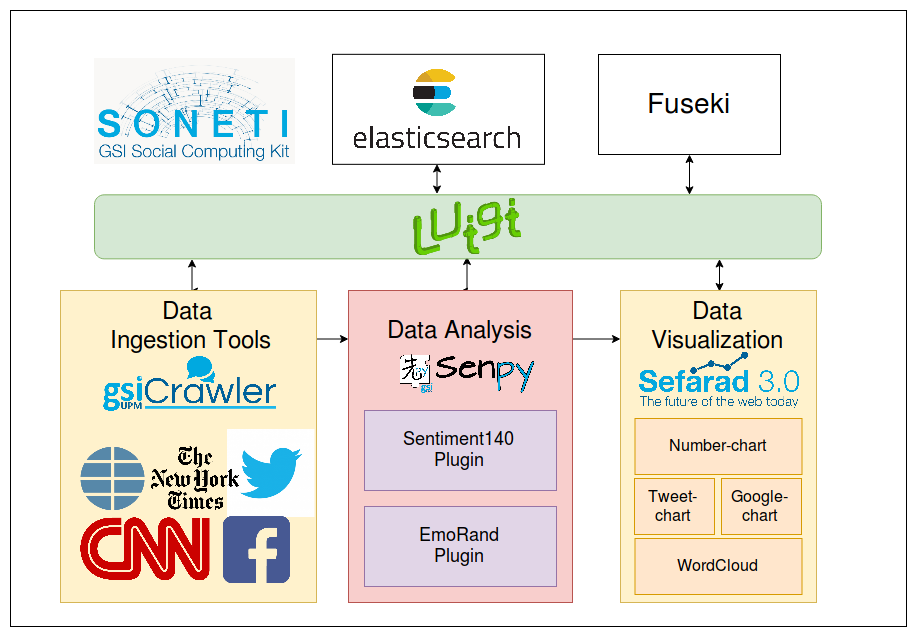
- GSICrawler: This ingestion service demo has CNN, New York Times, ElMundo, Facebook and Twitter as possible sources. This service is available on http://localhost:5000
- Senpy: This analysis service demo has sentiment140 as sentiment analysis plugin and EmoRand as emotion analysis plugin. This service is available on http://localhost:8000/
- Sefarad: This visualization demo environment provides a dashboard for Somedi project and is available on http://localhost:8080.
- Orchestrator: Luigi provides a web interface to check your workflows status on http://localhost:8082

